
A phone pulls at us dozens of times a day. We build the other way: a personal AI assistant that lives not in your phone but next to you, on your desk. It is a physical device with a screen, a voice and sensors. It knows your day, remembers what you agreed to and tells you only what matters.
The first such assistant is Aurora. We built her inside a 1976 Braun DN 40 clock. Through her we show what a client gets.
The idea: less phone
The assistant reads mail, calendars and messengers on its own. Only what really matters reaches its owner. Aurora speaks first at most three times a day, and never in meetings. Everything else waits.
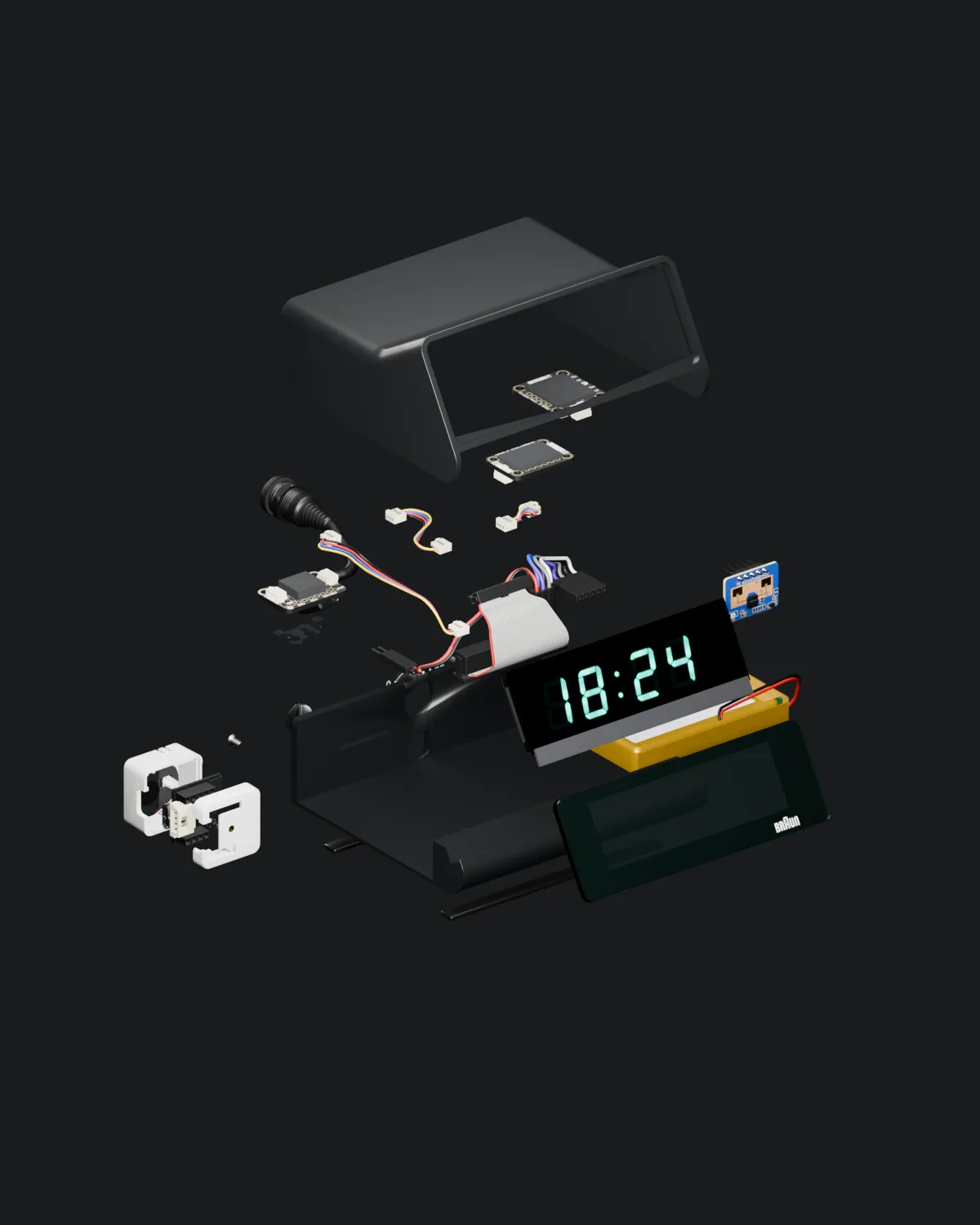
Inside
Outside, 1976. Inside, the future.
The original board became the chassis. Everything new plugs in.
What the assistant does
- Morning story. While the owner sleeps, Aurora reads the calendar, mail and Telegram. In the morning, one short story: meetings, promises, bills.
- Memory. Promises, deadlines, bills and meetings from mail and chats land in her memory on their own, and she reminds in time.
- Presence. A radar sees the person at the desk. Arrive, and Aurora wakes up. Leave, and the screen goes dark.
- Air. A sensor watches CO₂, temperature and humidity and says when it is time to open a window.
- Sleep and heart. Data from Apple Health, only when the owner asks.
- “I’m heading out”. One phrase at the door, and Aurora lists what the day needs: an umbrella, a meeting, a parcel, a promised reply.
- Actions only with a “yes”. Aurora drafts a reply in Telegram or mail, shows the exact text on screen and waits for a firm “send it”.
How it works
One assistant, several parts:
- The device. Screen, voice, radar, air sensor, battery.
- The assistant’s server. Memory, calendar, mail, Telegram.
- Language models. A local one for quick answers, a large one for hard tasks.
- iPhone. An app with Face ID, Siri, widgets and notifications.
Each source is connected read-only, or read and write. Writing always waits for a “yes”.
The rules
An assistant with access to mail and messengers has to be predictable. So Aurora has clear rules, and the owner can switch any of them off:
- messages are never stored;
- nothing goes out without a “yes”;
- facts only, nothing made up;
- silent in meetings and quiet hours;
- near the device, the phone stays quiet;
- Face ID sign-in to the app.
What the client gets
- A device in a case of your choice. Aurora lives in a 1976 clock bought for €34. The original board became the chassis, and the new screen sits right behind the original glass.
- Your sources. Mail, calendars, messengers, contacts, health and work systems. Each one read-only or read and write.
- Your rules. When the assistant stays silent, what it may send itself and what only after a “yes”.
- An iPhone app. The same design as the device: Face ID, alarms, voice, widgets.
Less phone. More life. See it live: aurora.tymko.tech.